Bulk hiring breaks manual screening in a predictable way. A campus drive brings in thousands of applicants, a seasonal ramp-up needs fifty hires in a month, a new centre opens and everyone must be in place by the same date. Resumes pile up, recruiters skim, good candidates are missed and weak ones slip through. Candidate screening software exists to fix this, but not every tool is built for volume. This checklist walks through what to confirm before you buy, how to run a pilot, and which mistakes to avoid, so your next high-volume hiring round is faster and fairer without losing quality.
What Makes Bulk Hiring Different?
High-volume hiring is not just normal hiring done more times. Three things change:
- Volume spikes. Hundreds or thousands of candidates may need to be assessed in a short window, often at the same time.
- Consistency matters more. With many reviewers and many candidates, small differences in how people are judged turn into unfair outcomes.
- Recruiter time is the bottleneck. Every manual step, from sending links to scoring tests to updating spreadsheets, multiplies by the number of candidates.
Good candidate screening software removes most of these manual steps and gives every candidate the same, structured evaluation.
The 15-Point Bulk-Hiring Checklist
A. Scale and Setup
- Can it handle your peak volume? Ask how many candidates can be invited and tested at the same time, and whether performance holds during a large drive. Request a reference from a customer who ran a similar volume.
- Can you invite candidates in bulk? Uploading a list or syncing from your tracking system should be quick. Sending links one by one defeats the purpose.
- Can tests be tailored to each role? One generic test for every opening produces generic results. Look for role-specific assessments covering the skills each job actually needs.
- Does it support the formats you need? Depending on the role, you may need MCQs, written answers, coding tests, video responses, assignments, and psychometric or aptitude assessments. Check that the formats you need are available in one platform.
B. Quality and Integrity
- Is proctoring built in? For large online drives, you need monitoring that discourages cheating and supports test integrity. Ask exactly what is monitored and how flagged sessions are reviewed.
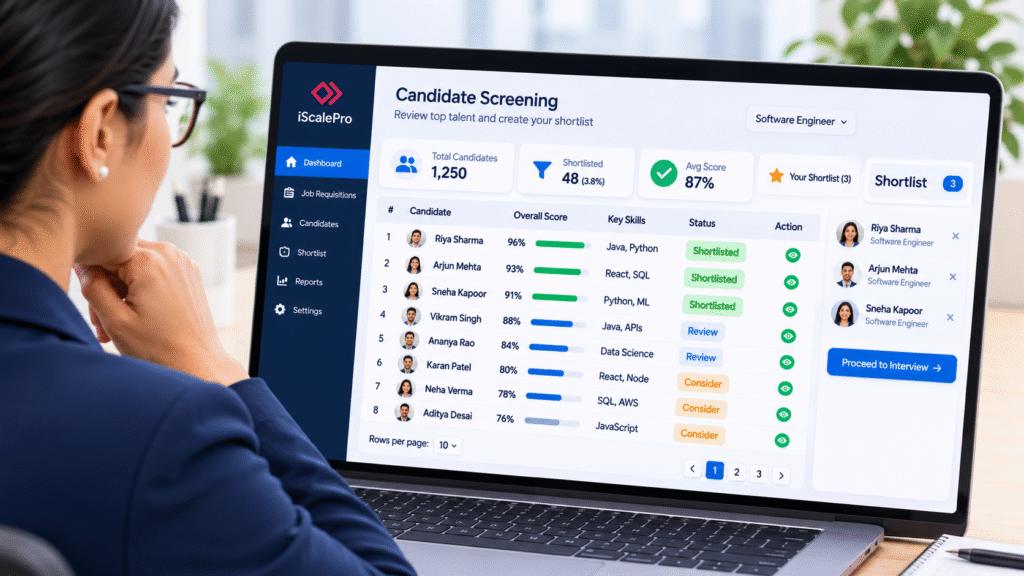
- Does it score automatically? Auto-scoring is what makes bulk screening practical. Check how open-ended and coding responses are evaluated, and whether manual review is possible where judgement is needed.
- Does it go beyond a single score? A skills score alone can be misleading. Look for reports that combine skills with behavioural and cognitive signals, show strengths and gaps, and suggest interview focus areas.
- Can you set cut-offs and shortlist rules? You should be able to define pass marks, rank candidates and shortlist automatically, while keeping the option to review borderline cases.
C. Workflow and Integration
- Does it connect to your ATS or HRIS? Results should flow into the systems your team already uses. If they do not, someone will copy data by hand, which defeats the saving. Some platforms also include their own applicant tracking, which can simplify the setup.
- Does it automate communication? Invitations, reminders and status updates should go out automatically, so recruiters are not chasing hundreds of candidates by email.
- Is reporting clear enough for hiring managers? Reports should be readable by non-specialists, comparable across candidates and exportable.
D. Fairness, Risk and Cost
- Is the process consistent and defensible? Every candidate for a role should get the same assessment under the same conditions. Ask how the vendor supports fair, structured evaluation, and keep human review in the final decision.
- How is candidate data protected? Ask about data storage, access controls and retention. Confirm that the vendor’s practices fit your company’s policies and the laws that apply to you.
- Is pricing transparent at scale? Per-candidate pricing is easy to forecast for drives, while licences suit steady year-round hiring. Ask about setup fees, minimums and extra charges for proctoring or reports.
- What support will you get during a live drive? Bulk drives have fixed dates. Ask about onboarding, test setup help, and who you call if something fails on the day.
iScalePro provides dedicated on-call support during recruitment drives and campus interviews to keep assessments running smoothly. Its technical support team can also accompany you on-site during campus drives, at affordable support and travel costs.
Quick Comparison: Manual Screening vs Screening Software
Factor | Manual Screening | Screening Software |
Time per candidate | High, grows with volume | Low, largely automated |
Consistency | Varies by reviewer | Same test and scoring for all |
Evidence of ability | Resume claims and interviews | Tested skills and traits |
Integrity at scale | Hard to monitor | Proctoring options |
Recruiter workload | Heavy, repetitive | Focused on shortlisted candidates |
Reporting | Spreadsheets | Structured reports and dashboards |
How to Run a Pilot Before You Commit
A short pilot tells you more than any demo. Follow this process:
- Pick one real role and a small group, for example fifty candidates.
- Build or select the assessment and agree on the pass mark with the hiring manager.
- Run it under real conditions, including proctoring and your normal invitation process.
- Compare results with your own judgement. Do the top-scoring candidates look right to your hiring managers?
- Check the candidate experience. Ask a few candidates about clarity, timing and any technical problems.
- Review time saved at each step, from invitation to shortlist.
- Decide, then scale. Roll out to the full drive only once the pilot confirms the setup works.
Bulk Hiring Scenarios and What to Prioritise
Scenario | Prioritise |
Campus and fresher drives | High concurrency, aptitude and coding tests, proctoring, quick results |
Seasonal or ramp-up hiring | Fast setup, automated communication, clear cut-offs |
Tech hiring at volume | Coding tests, assignments, anti-cheating controls |
Sales and customer-facing roles | Scenario-based questions, behavioural and psychometric fit |
Lateral hiring in batches | ATS integration, structured reports, interview guides |
Common Mistakes in Bulk Hiring Screening
- Using one generic test for every role
- Skipping a pilot and going live with an untested setup
- Treating a single score as the whole decision
- Setting cut-offs without checking them against real performance
- Ignoring candidate experience, which increases drop-offs
- Not planning for technical problems on the day of the drive
- Choosing on price per candidate without checking setup, proctoring and report costs
- Leaving results in a separate system from your ATS
How iScalePro Supports Bulk Hiring
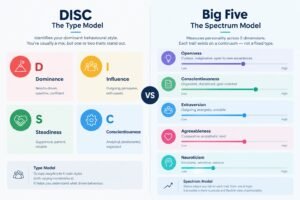
iScalePro is a talent assessment platform with a built-in applicant tracking system, designed to take bulk hiring from invitation to decision in one connected workflow. Its skill assessments are built role by role with MCQ, Q&A, coding and video formats, automated and manual evaluation, and secure proctoring. Psychometric assessments add behavioural and role-fit insight using DISC and OCEAN, and assignments let you evaluate real work for roles where it matters.
The Smart ATS tracks candidates through stages and triggers the right assessment from the hiring workflow, and the platform can integrate with ATS and HRIS tools you already use. iScalePro also supports bulk candidate assessment for campus placement drives, including coding tests, aptitude evaluation, psychometric screening and mock interviews. Enterprise-grade assessments start at ₹50 per candidate, and you can review current pricing plans, compare the platform on the iScalePro vs Mercer Mettl and iScalePro vs Testlify pages, or read how other organisations use it in the customer success stories.
Planning a high-volume hiring drive? Book a free demo to see how iScalePro would handle your next round.
It is software that evaluates applicants before interviews, usually by sending online tests, scoring them automatically and producing reports so recruiters can shortlist faster and more consistently.
Yes. iScalePro provides dedicated on-call support during recruitment drives and campus interviews. Its technical support team can also accompany you on-site for on-the-ground assistance, at affordable support and travel costs.
The ability to invite and test many candidates at once, role-specific tests, proctoring, automatic scoring, ATS integration and automated communication. Clear reporting and transparent pricing also matter at scale.
It lets you assess large groups of students in the same window with coding, aptitude and behavioural tests, with proctoring for integrity and automated results so that shortlists are ready quickly.
Yes. iScalePro can curate role-specific assessment questions for corporate hiring and campus recruitment. The team holds a discovery call to understand your requirements before preparing the assessments.
No. It narrows the pool and gives interviewers better information. Interviews and human judgement still make the final decision.
Use proctoring, time limits, varied question formats and role-relevant tasks. No method is perfect, so combine them with interview follow-up for shortlisted candidates.
Pricing varies by vendor and volume. Some charge per candidate and others use licences. iScalePro lists enterprise-grade assessments from ₹50 per candidate, and current plans are on its pricing page.
Often one to two weeks is enough to test a real role with a small group and compare results with your hiring managers’ judgement before scaling.